
GPT for Sheets: AI formulas and lead enrichment in Google Sheets
Use AI for Sheets as a lightweight Clay alternative: enrich leads, research companies, score prospects, create outreach, and run ChatGPT, Claude, Gemini, Grok, OpenRouter (any model) and 100+ AI models in Google Sheets.
Use ChatGPT, Claude, Gemini, Grok, Apollo, Hunter, Prospeo, LeadMagic and web research functions to enrich leads, research companies, score prospects and process thousands of rows.
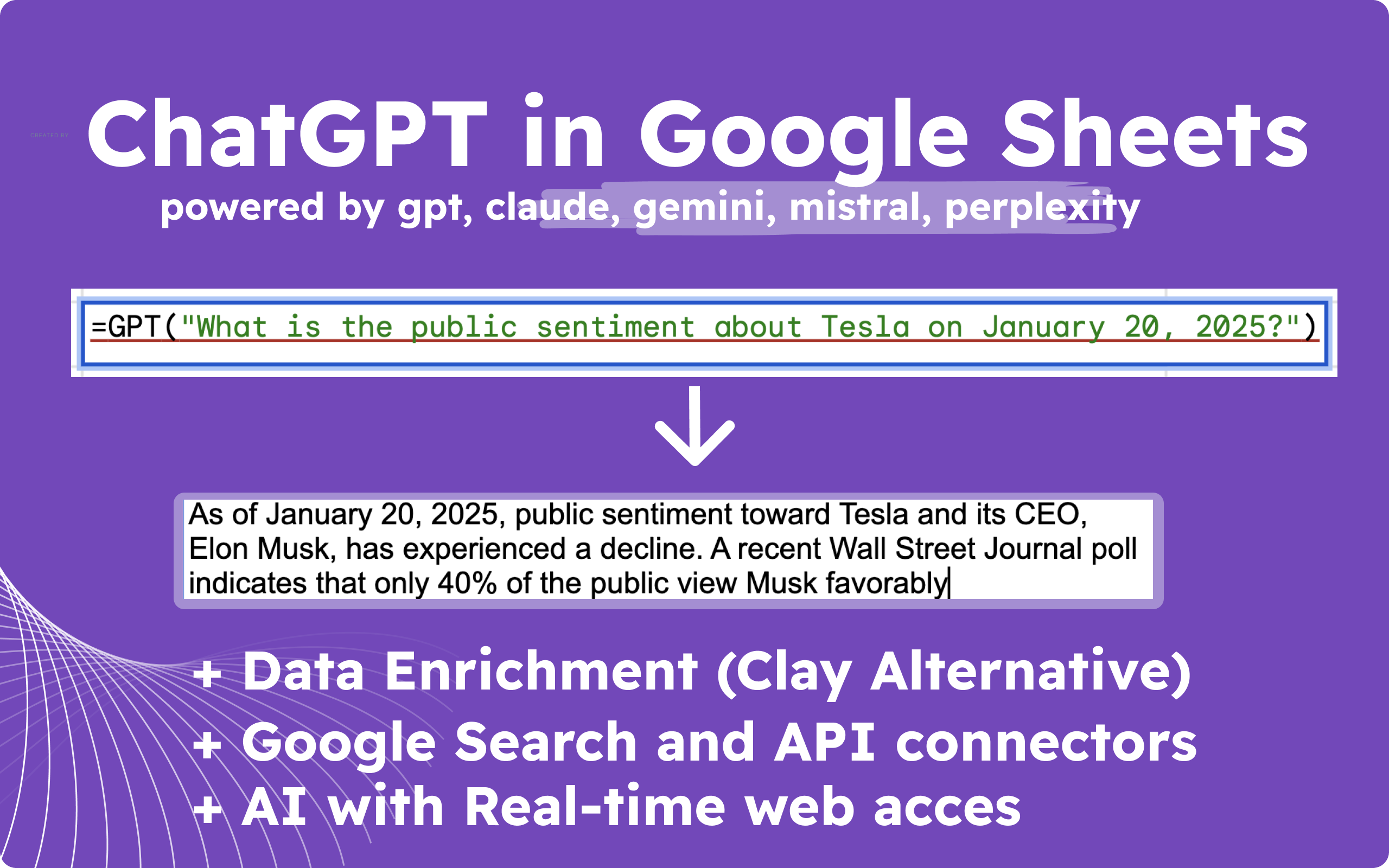
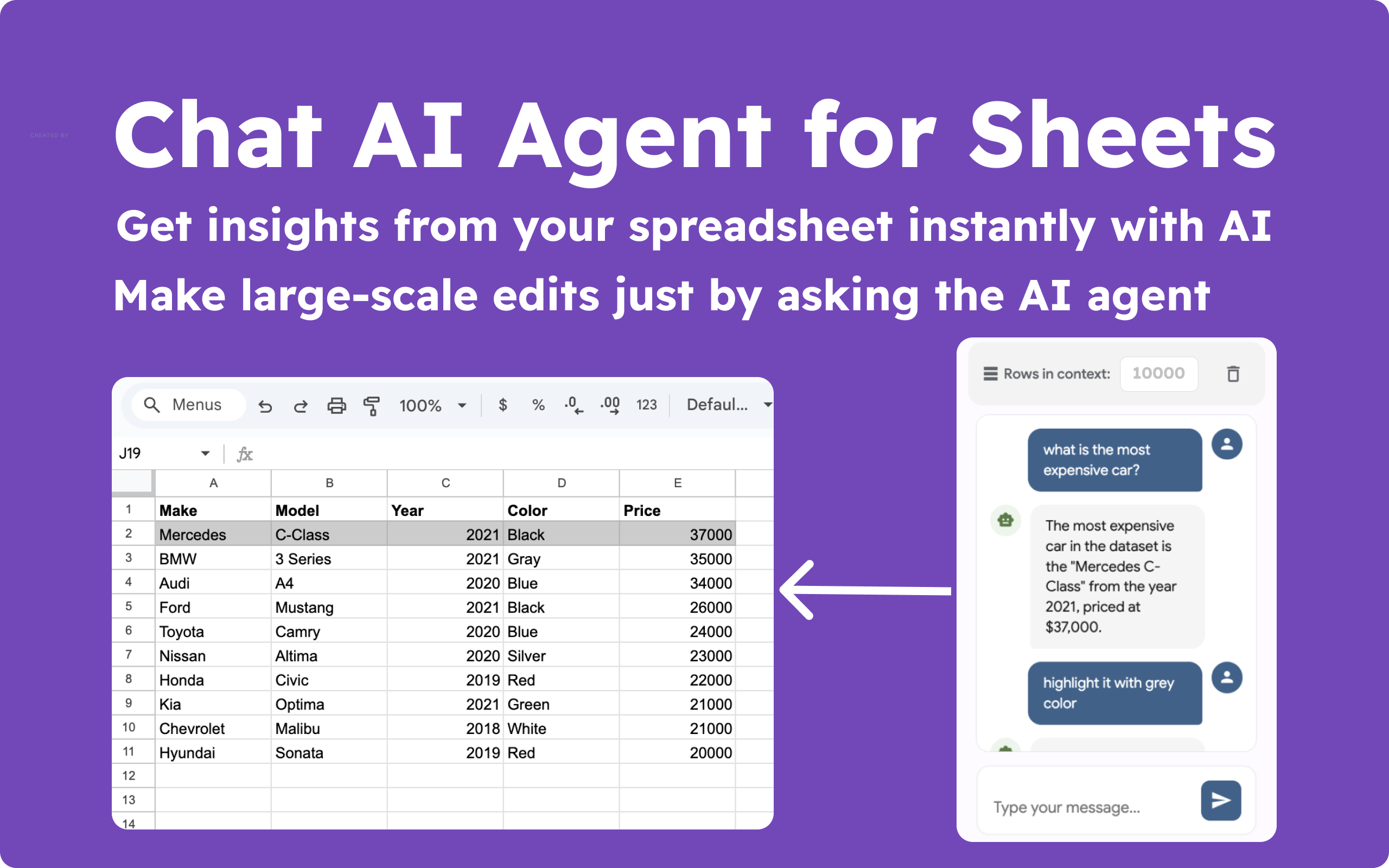
Turn Google Sheets into a lightweight Clay alternative
Enrich leads, research accounts, score prospects, and generate personalized outreach directly in the spreadsheet you already use.
Find emails, enrich domains, research companies, and personalize outreach.
Recommended: Business
Process hundreds or thousands of rows with GPT, Claude, Gemini, Grok, and Perplexity.
Recommended: Pro
Generate metadata, product descriptions, keyword clusters, briefs, and review summaries.
Recommended: Pro or Business
Use included AI credits first, then connect your own provider keys when ready.
Recommended: Starter
Pricing anchor: Clay starts around $349/mo. GPT for Sheets Business is $39.99/mo and works inside Google Sheets — save $3k+/year for lightweight enrichment workflows.
Why choose AI for Sheets for lead enrichment and bulk AI workflows?
Run AI formulas, research, enrichment and content workflows where your data already lives: Google Sheets.
- 🚀 AI Powerhouse: Support ALL AI models with web access: GPT, Perplexity, Claude, Gemini, Mistral.
- ⚡ Automated Page Generation: Create 1000+ SEO-optimized pages in just 1 click (Programmatic SEO and Lean SEO).
- 🔀 OpenRouter — any model: You’re not limited to the built-in models — run any model via OpenRouter (300+) with =OPEN_ROUTER().
- 📤 Bulk Email Simplified: Send personalized email campaigns at scale with EMAIL_SEND().
- 📺 YouTube Data Integration: Search and analyze YouTube channels, creators, and videos directly in Sheets with YOUTUBE_SEARCH(), YOUTUBE_CHANNEL(), and YOUTUBE_VIDEO() functions.
- 🔎 Scrape Emails and Leads from Google Search: Use clever operators with =SERP() to extract data like emails and social profiles for outreach. For example: =SERP("site:instagram.com Yoga gmail.com").
- 🔍 Google Maps Integration: Analyze competitors and customer reviews directly in Sheets for smarter decision-making.
- 🌍 Data Enrichment Made Easy: Enrich leads using integrations with Google Maps, Hunter, Apollo, Prospeo, LeadMagic, MailChimp, Google Search, and AI models with web access.
- 🌍 Integrate Any Service: Use the API() function to seamlessly connect any of your services with Sheets.
- 📈 Sales Optimization: Enrich domain lists with emails, phones, LinkedIn URLs, and other data for personalized cold outreach with Apollo, LeadMagic and Prospeo integrations.
- 💼 LinkedIn Enrichment: Enrich LinkedIn URLs with emails, phones, and other data for personalized cold outreach with Hunter, Apollo, LeadMagic, MailChimp, Gmail and Prospeo integrations.
- 🔗 Google Indexing: Use GOOGLE_INDEX() to request indexing of your URLs in bulk directly from Sheets.
- 🎨 SMM at Scale: Generate AI images in bulk with DALL-E and REPLICATE (supports over 100+ AI models for image generation).
- 🖼️ Extract Data from Images: Use GPT_VISION to extract data from images, PDFs, and more.
- 🌐 Website Scraping Simplified: Combine AI and built-in functions like WEB_CONTENT(site), WEB_H1, and WEB_PARAGRAPHS to extract and process content from websites.
- 📱 SMM Made Easy: Create 1000+ posts for LinkedIn, Twitter, Instagram, Reddit, YouTube, and more, in minutes.
- 🔍 SEO That Works: Access tools for keyword research, search volume, and competitor analysis (alternative to SemRush, Ahrefs).
- 🔧 Clay Alternative: Simplified and powerful tools for lead and data enrichment.
- ✍️ Automate Content Creation: Use CREATE_FILE() and REPLACE_TEMPLATE() to generate and store ready-made files in bulk directly from Sheets.
- ☁️ Seamless Uploads: Upload images and content with Cloudinary integration—no limits, no downtime.
During purchase, please use the same email you will use in Google Sheets, preferably a personal (not company) email.
GPT for Sheets Pricing Plans - Choose Your Perfect Plan
Start using GPT for Sheets today with our flexible pricing options. All plans include access to ChatGPT, Claude, Gemini and more.
I'm actively adding new features to make this app even better. The price is going up every 30 sales, but if you buy now I will lock in your rate!
- 1000 queries / month - About 5 million words of gpt-4o inputs & output
- No need for API keys
- SERP function to get top results from the Search
- WEB Scraping functions
- Support 100+ languages
- GPT to get the result of ChatGPT in a single cell
- GPT_TABLE, GPT_LIST to get a table of items from a prompt
- GPT_FORMAT to sanitize your sheet data into the same format
- GPT_EXTRACT to extract entities from your Sheets™ data
- GPT_SUMMARIZE to summarize your sheet content
- GPT_CLASSIFY to classify sheet content into a single category
- GPT_TAG to apply tags to your sheet content
- GPT_TRANSLATE to translate your spreadsheet content
- GPT_CONVERT to convert CSV to HTML to JSON to XML, etc.
- GPT_APPLY to apply any AI processing of you text
- GPT_SPLIT to split your text by phrase, sentence, etc..
$29.99/ mo
- More queries: 15000/ mo
- Access to all Starter features
- Time-based automation triggers (monthly, weekly, daily, hourly)
- NEW: GPT-5.5, Claude 4.8, Grok, DeepSeek
- GPT-4 Vision, DALL-E
- Other AI models: Claude, Mistral, Gemini, Perplexity
- Image generation
- Image vision
- OpenRouter AI
- SERP("docgpt.ai")
- With API() function you can push/pull your content on your site, service from Sheets!
- FLATTEN_JSON() - convert your JSON into table
- WEB Scrapping functions
- Great fit for programmatic SEO
- Great fit for Lean SEO
- You need to set up your API Key
- .
- .
- More queries: Unlimited
- Access to all Pro User features
- NEW: GPT-5.5, Claude 4.8, Grok, DeepSeek
- Place enriching tool using Google Maps
- Youtube Data integration - Search YouTube creators and videos
- EMAIL_SEND() - Bulk email sending
- Apollo, Hunter integration - get contacts by a domain
- Prospeo integration - get emails by a domain
- Prospeo - get linkedin and emails by a url
- LeadMagic integration
- MailChimp integration for sending emails
- REPLICATE() - integrated with Replicate AI service to help you generate images in bulk, using ANY AI model
- Great fit for programmatic SEO
- Great fit for Lean SEO
- Lead and Data Enrichment (Clay Alternative)
- GOOGLE_SEARCH()
- GOOGLE_INDEXING()
- CREATE_FILE()
- Brave Search API (web, videos, discussion) - returns search data for AI (2k /m requests free)
- Get Top Ranking Keywords of Competitors
- Get keyword suggestions, search volume, keyword difficulty
- Get keyword ideas by a keyword
- Get related keywords
- You need to set up your API Key
- CLOUDINARY() - Upload images to file hosting
- No request limits during high-traffic periods
- 2X faster response time
- Priority support
- .
- .
- .
- .
- Save 30%
- 1250 queries/mo - About 7 million words of gpt-4o mini inputs & output
- Access to all features
- No need for API keys
- SERP function to get top results from the Search
- WEB Scraping functions
- Support 90+ languages
- GPT to get the result of ChatGPT in a single cell
- GPT_TABLE to get a table of items from a prompt
- GPT_FORMAT to sanitize your sheet data into the same format
- GPT_EXTRACT to extract entities from your Sheets™ data
- GPT_SUMMARIZE to summarize your sheet content
- GPT_CLASSIFY to classify sheet content into a single category
- GPT_TAG to apply tags to your sheet content
- GPT_TRANSLATE to translate your spreadsheet content
- GPT_CONVERT to convert CSV to HTML to JSON to XML, etc.
- GPT_APPLY to apply any AI processing of you text
- GPT_SPLIT to split your text by phrase, sentence, etc..
- Online Support
- Weekly feature updates
$9.99/ mo
- Save 60%
- More queries: 17000/ mo
- Access to all Professional features
- Time-based automation triggers (monthly, weekly, daily, hourly)
- NEW: GPT-5.5, Claude 4.8, Grok, DeepSeek
- GPT-4.5 Vision, DALL-E
- Other AI models: Claude, Mistral, Gemini, Perplexity
- Image generation
- Image vision
- OpenRouter AI
- SERP("docgpt.ai")
- With API() function you can push/pull your content on your site, service from Sheets!
- FLATTEN_JSON() - convert your JSON into table
- WEB Scrapping functions
- Great fit for programmatic SEO
- Great fit for Lean SEO
- You need to set up your API Key
- Save 60%
- More queries: Unlimited
- Access to all Pro User features
- NEW: GPT-5.5, Claude 4.8, Grok, DeepSeek
- Place enriching tool using Google Maps
- Youtube Data integration - Search YouTube creators and videos
- EMAIL_SEND() - Bulk email sending
- Apollo, Hunter integration - get emails by a domain
- Prospeo integration - get emails by a domain
- Prospeo - get linkedin and emails by a url
- LeadMagic integration
- MailChimp integration for sending emails
- REPLICATE() - integrated with Replicate AI service to help you generate images in bulk, using ANY AI model
- Great fit for programmatic SEO
- Great fit for Lean SEO
- Lead and Data Enrichment (Clay Alternative)
- GOOGLE_SEARCH()
- GOOGLE_INDEXING()
- CREATE_FILE()
- REPLACE_TEMPLATE() - Create multiple templated content in Sheets
- Brave Search API (web, videos, discussion) - returns search data for AI (2k /m requests free)
- Get Top Ranking Keywords of Competitors
- Get keyword suggestions, search volume, keyword difficulty
- Get keyword ideas by a keyword
- Get related keywords
- You need to set up your API Key
- CLOUDINARY() - Upload images to file hosting
- No request limits during high-traffic periods
- 2X faster response time
- Priority support
- .
- .
- .
- .
- More queries: Unlimited
- Access to all Business features
- NEW: GPT-5.5, Claude 4.8, Grok, DeepSeek
- Great fit for programmatic SEO
- Great fit for Lean SEO
- Lead and Data Enrichment (Clay Alternative)
- You need to set up your API Key
- No request limits during high-traffic periods
- 2X faster response time
- Priority support
- .
- More queries: Unlimited
- Access to all Business features
- NEW: GPT-5.5, Claude 4.8, Grok, DeepSeek
- Great fit for programmatic SEO
- Great fit for Lean SEO
- Lead and Data Enrichment (Clay Alternative)
- You need to set up your API Key
- No request limits during high-traffic periods
- 2X faster response time
- Priority support
- .
Important!
If you encounter the message: "Authorization is required to perform this action."
- Use a personal Gmail account: If you use a company email (workspace), it may have restrictions on using add-ons. You might need to ask your company's email administrator to configure settings to allow the installation of add-ons. Therefore, it's recommended to use a personal account. If you need to transfer your subscription, please contact support via chat.
- If you use a personal account and still encounter this issue, simply re-install the add-on.
- For more help, check out the following resources: Troubleshooting Guide, and The model does not exist, or you do not have access to it.
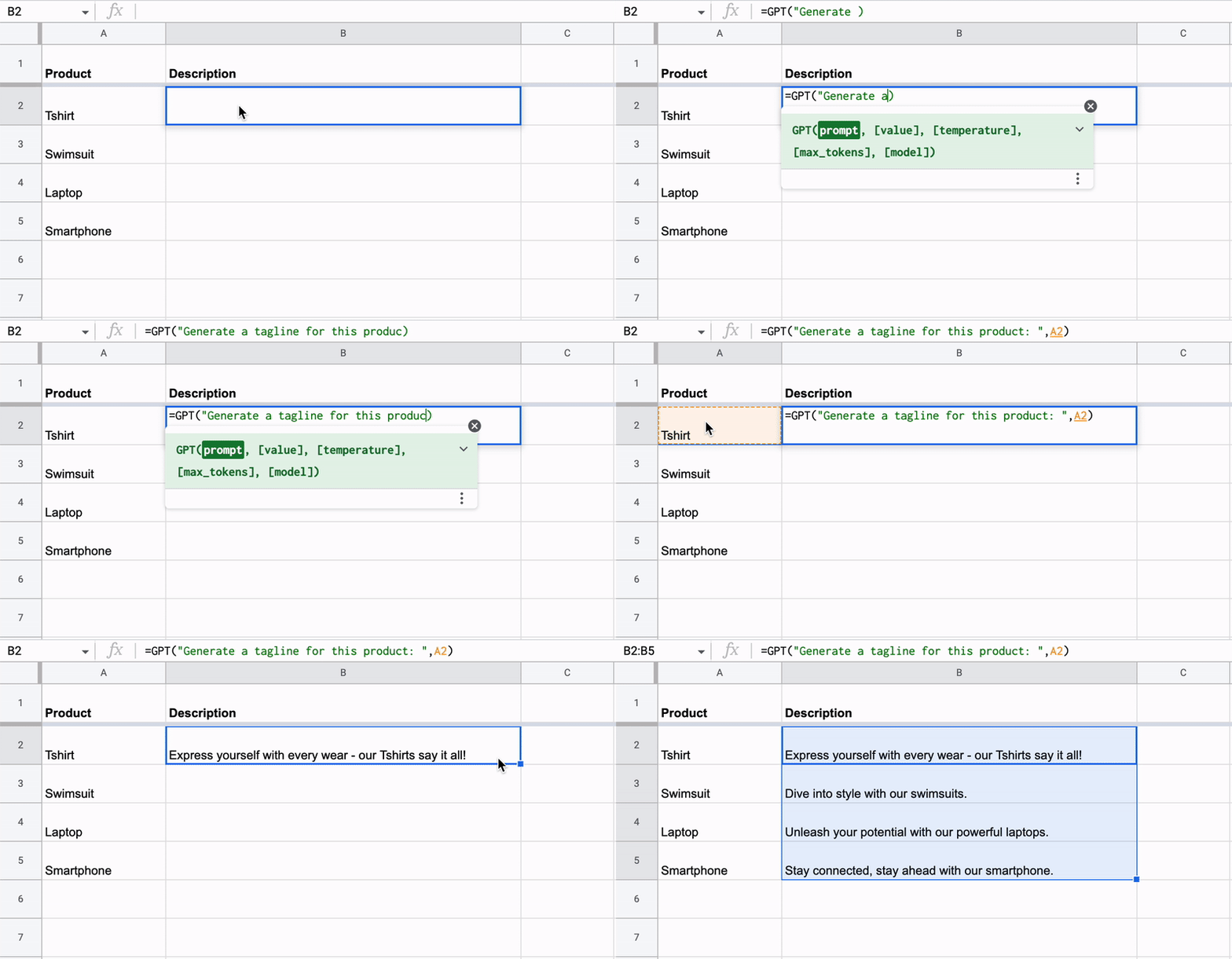
Basic Template & Creation multiple product descriptions at once

Lead Enrichment - generate leads from data

Place enriching tool using Google Maps

Create Unique Up-to date content in bulk
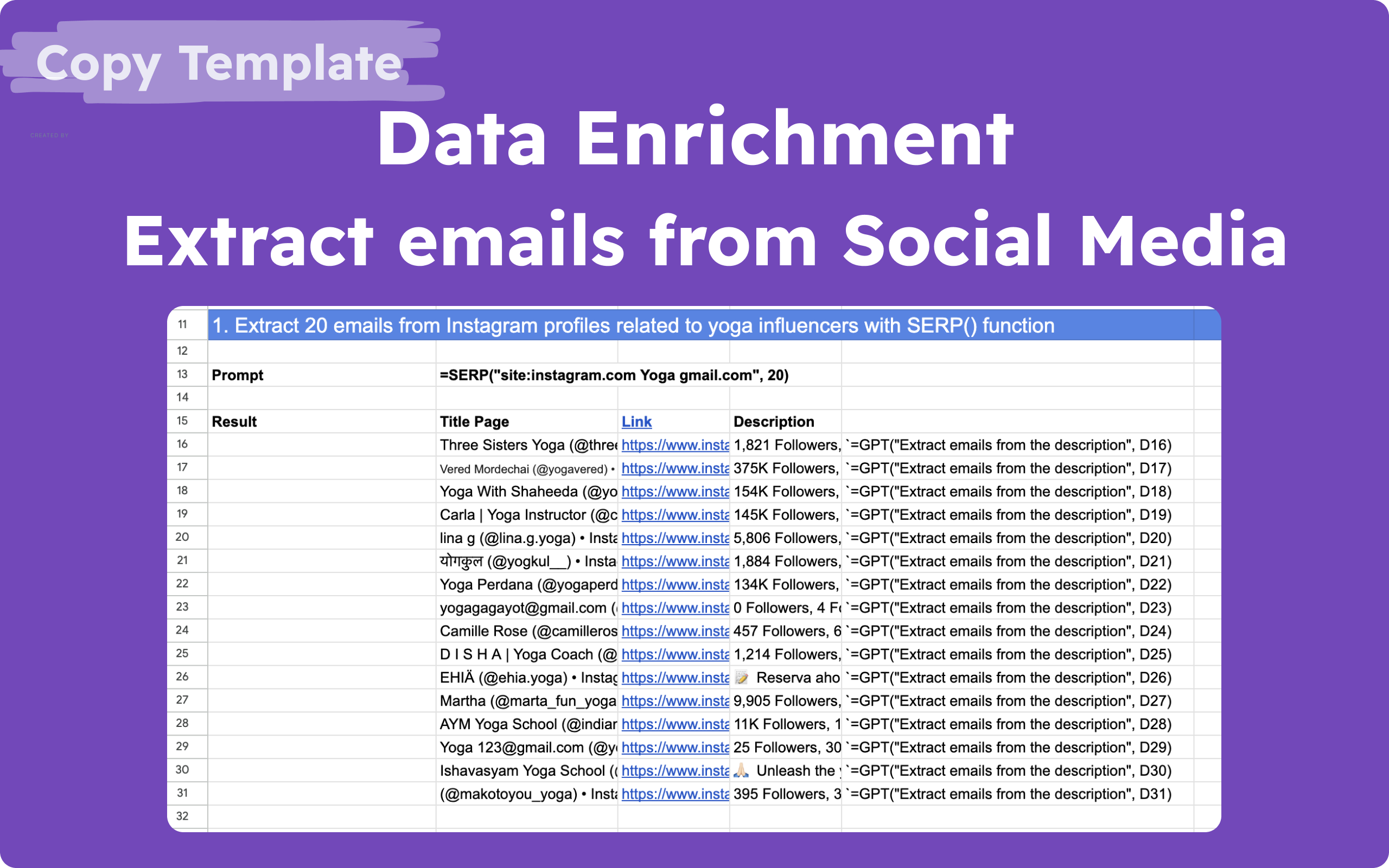
Extracting emails from social media
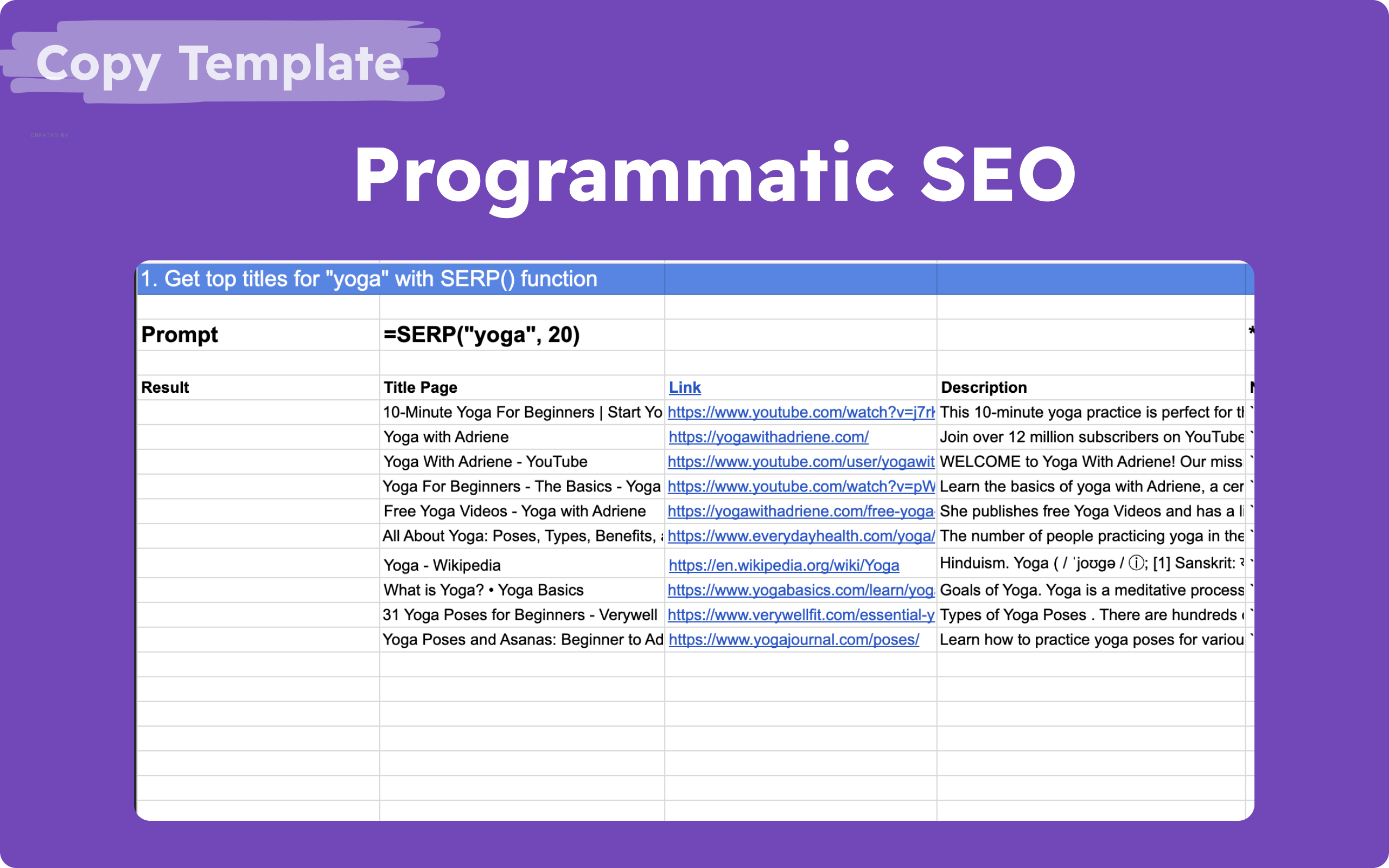
Programmatic seo | Generate 30 SEO-optimized pages at once
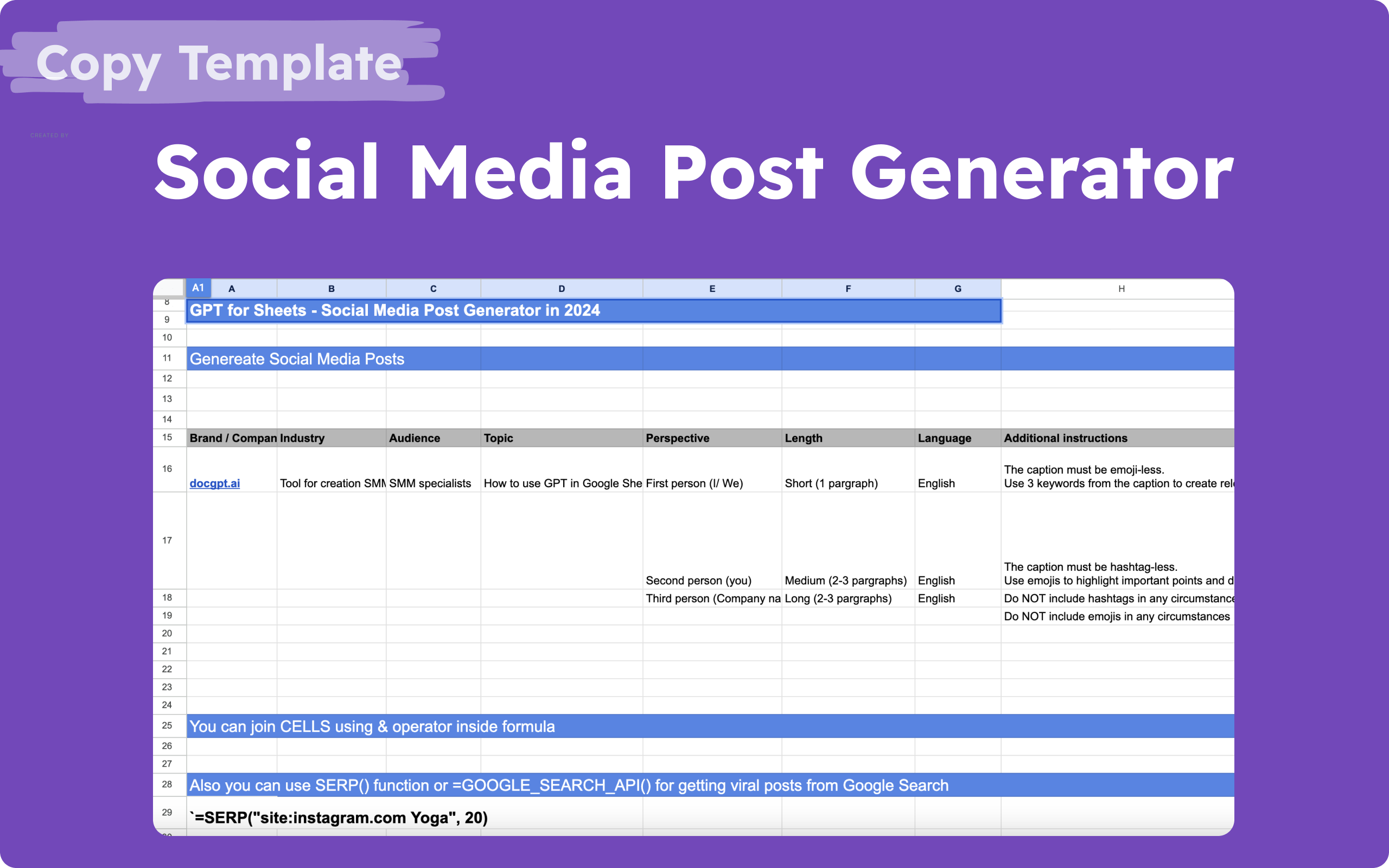
AI Social Media Generator
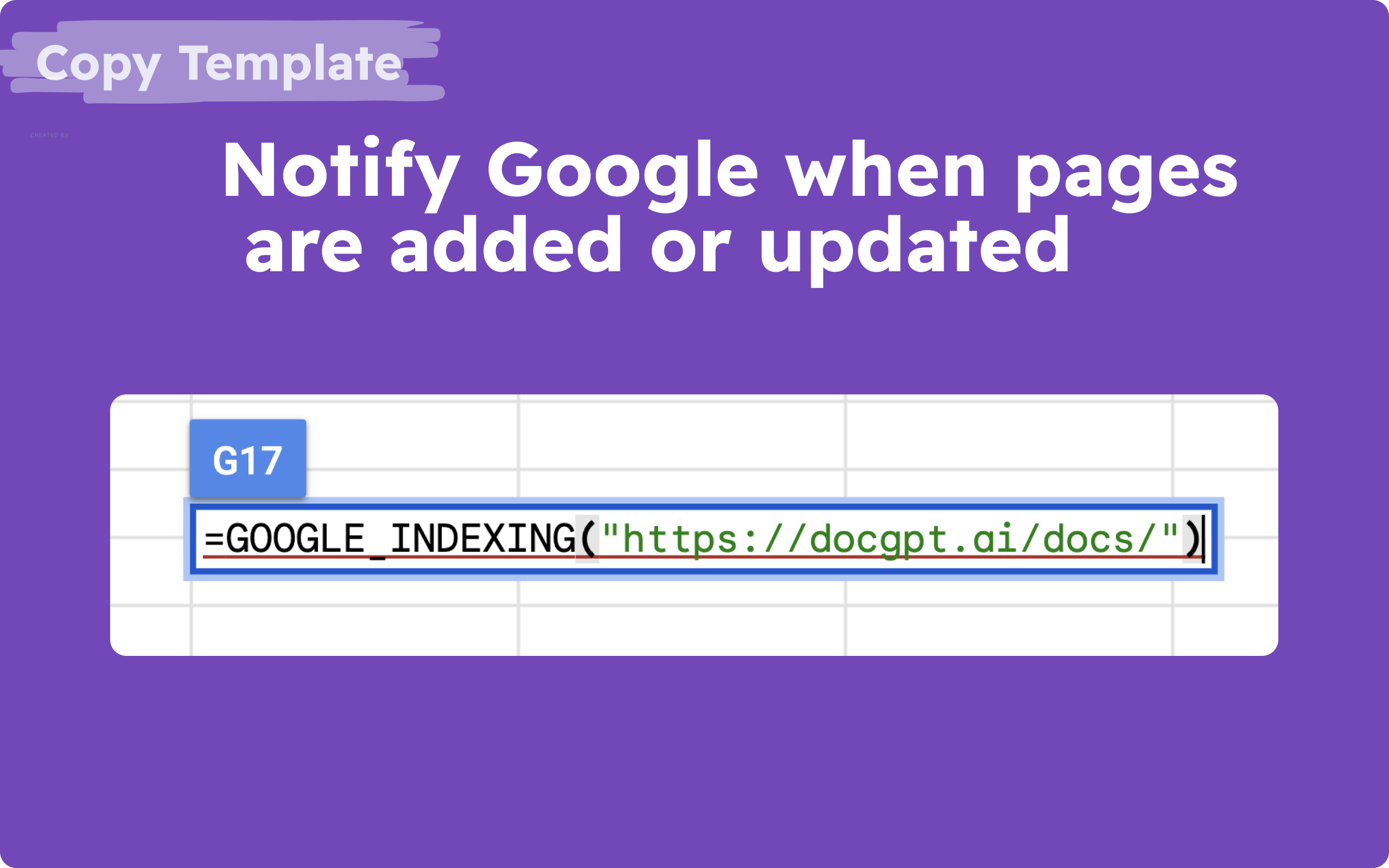
Notify Google when pages are added

Clay alternative (Hunter, Apollo, Prospeo, LeadMagic integration) for retrieving emails by domain, and LinkedIn information and emails by LinkedIn URL

Get Top Ranked Keywords for competitors, keywords suggestions. Ahref and SemRush in Sheets

I've employed this add-on within Sheets to craft SEO-focused product descriptions, meta descriptions, and meta titles for more than 300 products. It's been a lifesaver!

I purchased an annual subscription for the Professional version. Can't tell you how excited I am!
..

A few of our team members recently started using GPT for Sheets as part of their workflow and have been really enjoying it :) Just wanted to reach out first of all and say awesome job! Thanks so much!
Quickstart for Spreadsheets - Get Started with GPT for Sheets
-
Step 1Install Add-On
Go to Workspace Marketplace and click on Install button.
-
Step 2Open Google Sheets
Please open a Google Sheets where you want to use the add-on.
-
Step 3Launch the Add-On
Click on Extensions button, choose GPT for Docs Sheets and click Launch.
How to use GPT for Sheets to generate 1000+ SEO titles, meta tag descriptions, content
How to use ChatGPT in Google Sheets for generation 1000+ product descriptions
How to Extract Emails From Instagram, LinkedIn, Twitter (X.com), Facebook with ChatGPT in Google Sheets

| Goal | Copy / paste formula |
|---|---|
| Find public profiles & contacts in search results | =SERP("site:instagram.com fitness coach gmail.com", 40) |
| Scrape a page’s text to mine for emails | =WEB_PARAGRAPHS("https://example.com/contact") |
| Extract the email out of any text / cell | =GPT_EXTRACT(A2, "email address") |
| Email behind a LinkedIn profile (Business) | =PROSPEO_GET_EMAIL_BY_LINKEDIN("your-api-key", "https://linkedin.com/in/username") |
| Emails by company domain (Business) | =HUNTER_DOMAIN_SEARCH("your-api-key", "stripe.com") |
| A person’s email by name + domain (Business) | =LEADMAGIC_FIND_EMAIL("your-api-key", "Bill", "Gates", "microsoft.com") |
Social networks don’t expose emails directly — these formulas extract emails from public/web data and enrich via provider APIs. Enrichment functions (Prospeo, Hunter, LeadMagic) need a Business plan and that provider’s API key.
The GPT for Sheets formula library — by use case
Every example below is copy-paste ready. Click Copy, paste into any cell, swap in your own text or a cell reference (like A2), and drag it down to run across rows.
🤖 AI models — write, analyze, ask
Same simple syntax for every model — just change the function name. Included on paid plans (your own API key optional).
OpenAI GPT
=GPT("Write a tagline for a coffee shop")Claude (Anthropic)
=CLAUDE("Summarize this review in one line: " & A2)Google Gemini
=GEMINI("List 3 blog title ideas about " & A2)Grok (xAI)
=GROK("Write a witty product description for " & A2)DeepSeek
=DEEPSEEK("Translate to French: " & A2)Mistral
=MISTRAL("Classify the sentiment of: " & A2)Perplexity
=PERPLEXITY("What are today’s top AI news?")OpenRouter — any model
=OPEN_ROUTER("openai/gpt-5.5", "your-key", "Write a tagline for " & A2)Groq — ultra-fast own key
=GROQ("your-api-key", "llama-3.3-70b-versatile", "Write a tagline for " & A2)GPT with your own model
=GPT_CUSTOM("Write a tagline", "your-api-key", "gpt-4o")Gemini with your own model
=GEMINI_CUSTOM("your-api-key", "gemini-2.5-flash", "Write a tagline")✨ Everyday data tasks
Clean, classify and transform a whole column with one formula.
Translate
=GPT_TRANSLATE(A2, "Spanish")Summarize
=GPT_SUMMARIZE(A2, "one sentence")Extract data
=GPT_EXTRACT(A2, "email address")Classify / sentiment
=GPT_CLASSIFY(A2, "Positive, Neutral, Negative")Tag / categorize
=GPT_TAG(A2, "bug, feature, question")Fix grammar & spelling
=GPT_APPLY(A2, "fix grammar and spelling")Generate a list
=GPT_LIST("5 blog ideas about " & A2)Generate a table
=GPT_TABLE("Top 5 EU capitals", "City, Country, Population")Fill by example
=GPT_FILL(A2:B4, A5:A20)Reformat values
=GPT_FORMAT(A2, "YYYY-MM-DD")List across columns
=GPT_HLIST("top 10 cities")Split into rows
=GPT_SPLIT(A2, "sentences")Split across columns
=GPT_HSPLIT(A2, "sentences")🌐 Web search & scraping
Pull live web data, run searches and read any page into your sheet.
Ask the live web
=GPT_WEB_SEARCH("What are the top news headlines today?")Web answer as a table
=GPT_WEB_SEARCH_TABLE("Top 5 cryptocurrencies with price and market cap")Search results (SERP)
=SERP("best coffee shops in Austin", 20)Brave search own key
=BRAVE_SEARCH_WEB("AI news", "your-api-key")Scrape page text
=WEB_PARAGRAPHS("https://stripe.com")Scrape many URLs (bulk)
=WEB_URLS_DATA(A2:A50)Ask the web (with cells)
=GPT_WEB_ACCESS("Latest funding news about " & A2)Official Google search own key
=GOOGLE_SEARCH_API("latest tech news", "your-api-key", "your-search-engine-id", 5)Get a page title
=WEB_TITLE("https://stripe.com")Get the meta description
=WEB_DESCRIPTION("https://stripe.com")Get the H1 heading
=WEB_H1("https://stripe.com")Get all headings
=WEB_HEADINGS("https://stripe.com")Resolve final URL
=WEB_URL("https://stripe.com")Bulk search results
=WEB_BULKSERP("best CRM software")📈 SEO & content
Draft content, plan strategy and research keywords at scale.
Write an SEO blog draft
=SEO_BLOG("Best espresso machines 2026", "Professional", "English")Outrank a competitor page
=SEO_OUTRANK("https://competitor.com/post", "Friendly", "English")Build an SEO strategy
=SEO_STRATEGY("espresso machine, coffee grinder", "English")Keyword ideas DataForSEO
=GOOGLE_KEYWORD_IDEAS("espresso machine", "login", "password")Competitor’s ranked keywords
=GOOGLE_RANKED_KEYWORDS("competitor.com", 100, "login", "password")Push a URL to Google index
=GOOGLE_INDEXING("https://docgpt.ai/docs/")Keyword suggestions DataForSEO
=GOOGLE_KEYWORD_SUGGESTIONS("espresso machine", "login", "password")Related keywords DataForSEO
=GOOGLE_RELATED_KEYWORDS("espresso machine", "login", "password")🪄 Lead enrichment — a Clay alternative in Sheets Business
Find & verify emails and research companies. Each data provider’s API key goes right in the formula.
Find emails by company domain
=HUNTER_DOMAIN_SEARCH("your-api-key", "stripe.com")Find a person’s email
=LEADMAGIC_FIND_EMAIL("your-api-key", "Bill", "Gates", "microsoft.com")Verify an email
=HUNTER_EMAIL_VERIFIER("your-api-key", "patrick@stripe.com")Contacts from a company
=APOLLO_GET_CONTACTS("your-api-key", "company.com")Email behind a LinkedIn profile
=PROSPEO_GET_EMAIL_BY_LINKEDIN("your-api-key", "https://linkedin.com/in/username")Company funding & intel
=LEADMAGIC_COMPANY_FUNDING("your-api-key", "gong", "gong.io")Local businesses (Google Maps)
=GOOGLE_MAPS_GET_PLACES("API_KEY", "34.0522,-118.2437", 1000, "restaurant", "", 20)Email by domain + name
=HUNTER_GET_EMAIL_BY_DOMAIN("your-api-key", "reddit.com", "Alexis", "Ohanian")Email by company + name
=HUNTER_GET_EMAIL_BY_COMPANY_NAME("your-api-key", "Reddit", "Alexis", "Ohanian")Filtered domain search
=HUNTER_DOMAIN_SEARCH_FILTERED("your-api-key", "stripe.com", "senior", "marketing")Enrich an email
=HUNTER_EMAIL_ENRICHMENT("your-api-key", "patrick@stripe.com")All emails at a domain
=PROSPEO_GET_EMAILS("your-api-key", "company.com")LinkedIn profiles at a domain
=PROSPEO_GET_LINKEDIN("your-api-key", "company.com")Validate an email
=LEADMAGIC_VALIDATE_EMAIL("your-api-key", "user@example.com")Personal email from LinkedIn
=LEADMAGIC_PERSONAL_EMAIL("your-api-key", "https://www.linkedin.com/in/williamhgates")Work email from LinkedIn
=LEADMAGIC_B2B_PROFILE_EMAIL("your-api-key", "https://linkedin.com/in/username")Company lookup
=LEADMAGIC_COMPANY_SEARCH("your-api-key", "https://www.linkedin.com/company/leadmagichq", "leadmagic.io", "Leadmagic")Find competitors
=LEADMAGIC_COMPETITORS("your-api-key", "gong.io", "https://www.linkedin.com/company/gong-io", "Gong")Enrich a LinkedIn handle
=LEADMAGIC_PROFILE_SEARCH("your-api-key", "jesseoue")One place by ID (Maps)
=GOOGLE_MAPS_PLACE_GOOGLE("your-api-key", "ChIJN1t_tDeuEmsRUsoyG83frY4")🎨 Images & vision
Generate images from a prompt, or have AI read and describe any image.
Generate an image (OpenAI)
=GPT_CREATE_IMAGE("a minimalist coffee shop logo, flat vector", "1024x1024")Generate an image (Gemini)
=GEMINI_CREATE_IMAGE("a cozy cafe interior, watercolor", "16:9")Read / describe an image
=GPT_VISION("https://example.com/photo.jpg", "What is in this image?")Replicate model (by URL) own token
=REPLICATE_USING_MODEL_URL("your-token", "A scenic landscape", "https://api.replicate.com/v1/models/stability-ai/sdxl")Host an image (Cloudinary)
=UPLOAD_TO_CLOUDINARY("your-cloud-name", "preset-name", "https://example.com/image.jpg")⚙️ Automation & integrations
Connect anything — call APIs, send email, post to socials, reshape data.
Call any REST API
=API("GET", "https://dogapi.dog/api/v2/breeds", "", "", "", false)Send an email
=SEND_EMAIL("jane@acme.com", "Quick question", "Hi Jane, ...", false)Post to LinkedIn
=LINKEDIN_POST("Check out our launch 🚀")Post to X (Twitter)
=TWITTER_POST("Hello World 🚀")Flatten JSON into columns
=FLATTEN_JSON(A2)Markdown → table
=MARKDOWN_TO_TABLE(A2)Send via Mailchimp
=MAILCHIMP_SEND_EMAIL("your-api-key", "you@company.com", "Subject", "Body text", "jane@acme.com")Build a mailto link
=MAILTO_LONG_TEXT("jane@acme.com", "Quick question", "Hi Jane, ...", false)Fill a text template
=REPLACE_TEMPLATES("Hi , welcome to !")Save a file to Drive
=CREATE_FILE_ON_DRIVE("notes.txt", "Meeting notes for today")Search YouTube videos
=YOUTUBE_DATA_SEARCH_VIDEO("google sheets ai", 10)Get a YouTube channel
=YOUTUBE_DATA_GET_CHANNEL("UC_x5XG1OV2P6uZZ5FSM9Ttw")Search YouTube channels
=YOUTUBE_DATA_SEARCH_CHANNELS("ai tools", 10)🧮 Free calculators
No-signup tools — see the numbers, then run the workflow in Sheets.
Clay Cost Calculator
Real cost per enriched contact vs a Clay alternative in Sheets.
AI Content Cost Calculator
AI vs human writer cost per article.
LLM API Cost Calculator
Token cost for GPT-5.5, Claude, Gemini, Grok.
Scraping WEB functions: Content, title, description, h1, h2, paragraphs, fetch in bulk
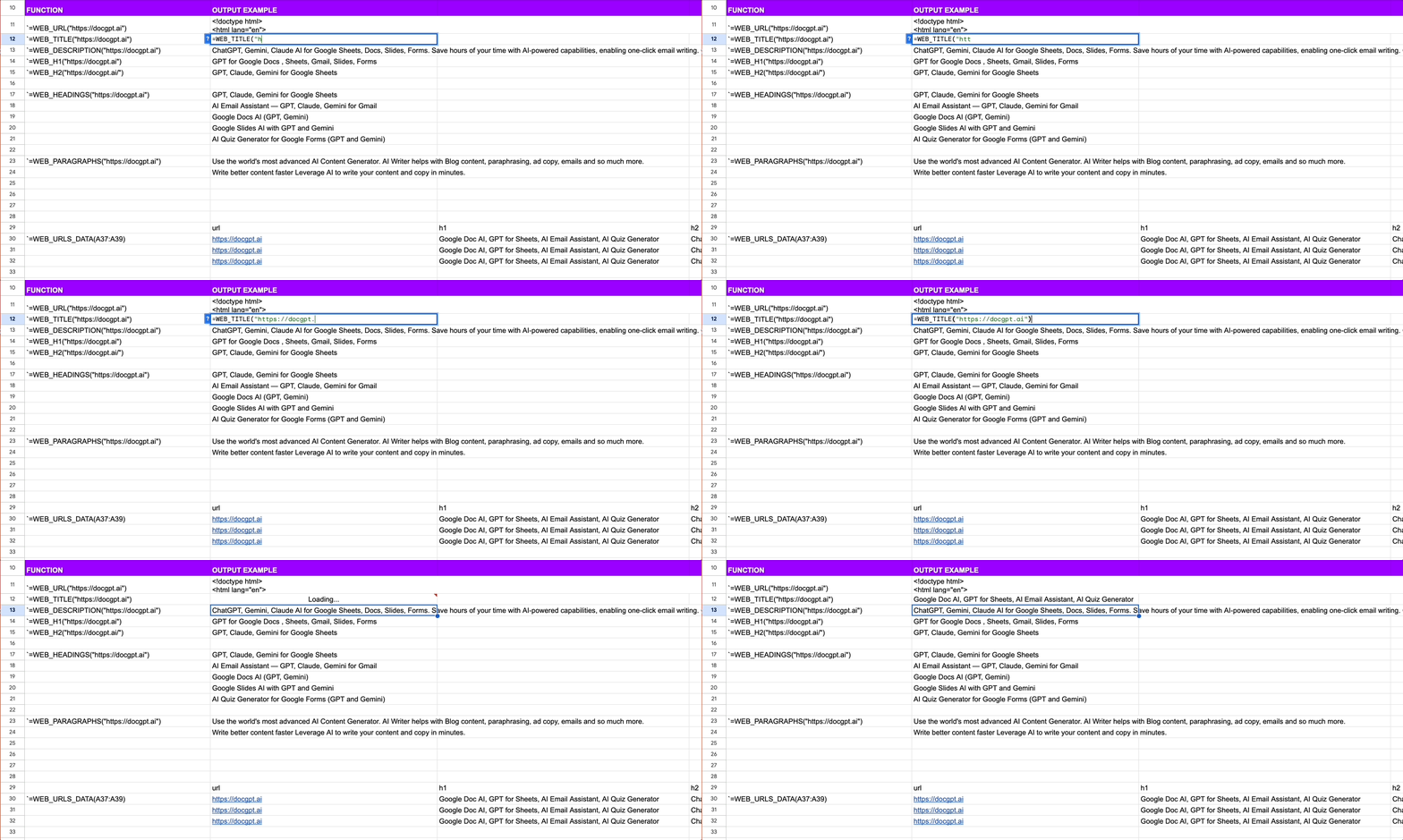
| Goal | Copy / paste formula |
|---|---|
| Get a page title | =WEB_TITLE("https://stripe.com") |
| Get the meta description | =WEB_DESCRIPTION("https://stripe.com") |
| Pull all body text from a page | =WEB_PARAGRAPHS("https://stripe.com") |
| Scrape many URLs at once (bulk) | =WEB_URLS_DATA(A2:A50) |
Use GPT function to create and rewrite content

| Syntax | =GPT(prompt, [value]) |
|---|---|
| Copy/paste example | =GPT("Write a tagline for BMW") |
| Copy/paste example | =GPT("Write a tagline for", B5) |
| Copy/paste example - arrays | =GPT(A1:B4) |
| Copy/paste example - several cells | =GPT(A1 & B4) |
| Localization | In some Google Sheets localization, you need to use ";" to separate parameters instead of "," |
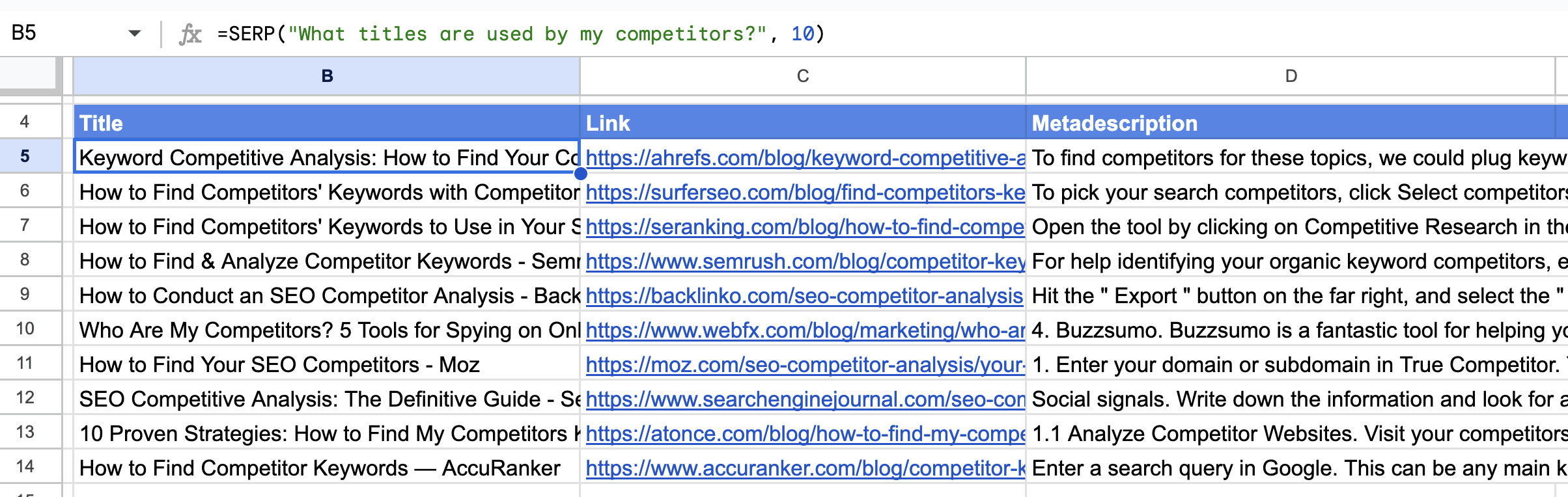
=SERP() functions return the top 20 search results from the Search Engine with the URL, meta title, and meta description.
| Goal | Copy / paste formula |
|---|---|
| Top 20 results for a query | =SERP("best coffee shops in Austin", 20) |
| Find LinkedIn profiles via search operators | =SERP("site:linkedin.com/in marketing director SaaS", 40) |
Re-try functions with errors
Use GPT function to improve product description


| Syntax | =GPT(prompt, [value]) |
|---|---|
| Copy/paste example | =GPT("Make shorter this product name max 3 words", A16) |
| Copy/paste example | =GPT("Make this product name more for Ebay customers", A22) |
| Localization | In some Google Sheets localization, you need to use ";" to separate parameters instead of "," |
Use GPT function for generation SEO metadata

| Syntax | =GPT(prompt, [value]) |
|---|---|
| Copy/paste example | =GPT("Write Responsive Display Google Ads description: ", "Travel Agency") |
| Localization | In some Google Sheets localization, you need to use ";" to separate parameters instead of "," |
Use GPT_VISION allows the model to take in images and answer questions about them

| Syntax | =GPT_VISION(url, prompt) |
|---|---|
| Copy/paste example | =GPT_VISION("https://static.nike.com/a/images/t_PDP_1728_v1/f_auto,q_auto:eco/b7d9211c-26e7-431a-ac24-b0540fb3c00f/air-force-1-07-mens-shoes-jBrhbr.png", "Write a short description for this product") |
| Copy/paste example | =GPT_VISION(A1, A2) |
| Localization | In some Google Sheets localization, you need to use ";" to separate parameters instead of "," |
Use GPT_TRANSLATE function to translate your text into 90+ languages

| Syntax | =GPT_TRANSLATE(text, target, [source]) |
|---|---|
| Copy/paste example | =GPT_TRANSLATE(A30, "norwegian","english") |
| Localization | In some Google Sheets localization, you need to use ";" to separate parameters instead of "," |
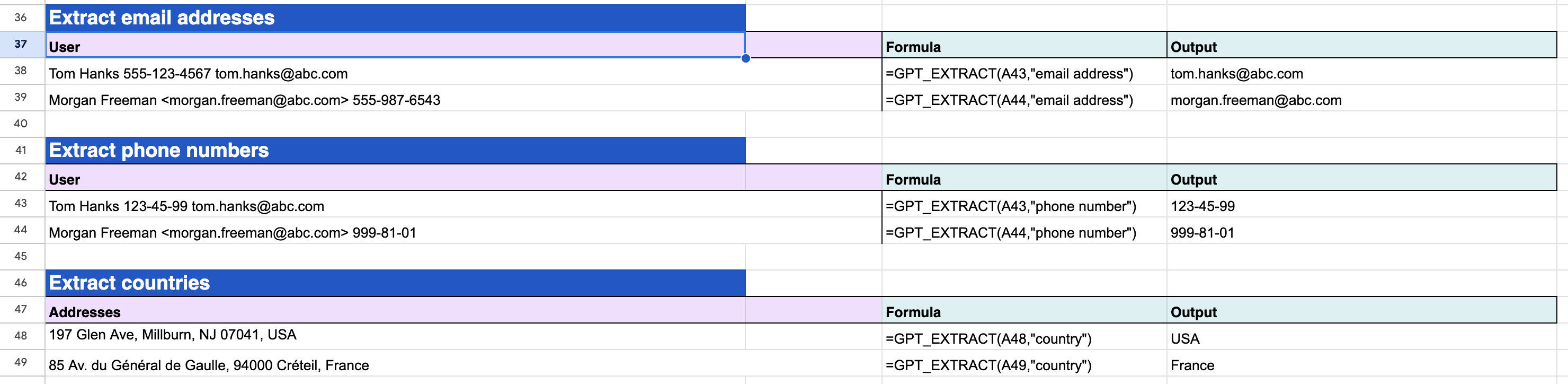
Use GPT_EXTRACT emails, first names, last names, countries...
| Syntax | =GPT_EXTRACT(text, to_extract) |
|---|---|
| Copy/paste example | =GPT_EXTRACT(A43,"email address") |
| Copy/paste example | =GPT_EXTRACT(A50,"phone number") |
| Copy/paste example | =GPT_EXTRACT(A57,"country") |
| Localization | In some Google Sheets localization, you need to use ";" to separate parameters instead of "," |
Use GPT_CLASSIFY to make sentiment analysis for comments, feedbacks, text

| Syntax | =GPT_CLASSIFY(text, categories) ➡️ |
|---|---|
| Copy/paste example | =GPT_CLASSIFY(A54,"very positive, positive, neutral, negative, very negative") |
| Localization | In some Google Sheets localization, you need to use ";" to separate parameters instead of "," |
Use GPT_TAG - Categorize or classify text with tags, keywords

| Syntax | =GPT_TAG(text, [tags]) |
|---|---|
| Copy/paste example | =GPT_TAG(A61, "travel, positive, nature, sunset, car, building, ai") |
| Copy/paste example | =GPT_TAG(A62, "entertainment, positive, car, building") |
| Localization | In some Google Sheets localization, you need to use ";" to separate parameters instead of "," |
GPT_TABLE generates a table with data
| Syntax | =GPT_TABLE(prompt, [headers]) |
|---|---|
| Copy/paste example | =GPT_TABLE("top 10 most popular cities and their population") |
| Copy/paste example | =GPT_TABLE("top 10 most popular cities and their population", A1:C1) |
| Localization | In some Google Sheets localization, you need to use ";" to separate parameters instead of "," |
GPT_LIST/GPT_HLIST generating a list with data
| Syntax | =GPT_LIST(prompt, [value]) |
|---|---|
| Copy/paste example | =GPT_LIST("top 10 most popular cities") |
| Copy/paste example | =GPT_HLIST("top 10 most popular cities") |
| Localization | In some Google Sheets localization, you need to use ";" to separate parameters instead of "," |
GPT_SPLIT/GPT_HSPLIT splits text semantically, such as by section, paragraph, sentence, customer...
| Syntax | =GPT_SPLIT(text, split_by) |
|---|---|
| Copy/paste example | =GPT_SPLIT("The sky is blue. The cat purrs softly. The sun shines brightly.", "sentences") |
| Copy/paste example | =GPT_HSPLIT("The sky is blue. The cat purrs softly. The sun shines brightly.", "sentences") |
| Localization | In some Google Sheets localization, you need to use ";" to separate parameters instead of "," |
GPT_APPLY utilizes the specified task on the provided text, with the default objective being to correct grammar and spelling errors
| Syntax | =GPT_APPLY(text, [task]) |
|---|---|
| Copy/paste example | =GPT_APPLY("He hav a book", "fix grammar and spelling") |
| Localization | In some Google Sheets localization, you need to use ";" to separate parameters instead of "," |
Frequently Asked Questions - GPT for Sheets by DocGPT.ai
Everything you need to know about GPT for Sheets by DocGPT.ai - the #1 AI add-on for Google Sheets. Comparing competitors? See GPT for Sheets and Docs by Talarian vs DocGPT.ai.
GPT for Sheets by DocGPT.ai is the industry-leading AI add-on with over 1 million installs and a 4.8/5 star rating from 1000+ reviews. Developed by DocGPT.ai, the trusted provider of AI productivity tools, it offers unmatched capabilities:
- ✅ 100+ AI models (GPT-5.5, Claude 4.8, Gemini, o1, o3, Grok, and more)
- ✅ Unlimited queries on Business plan - no other tool offers this
- ✅ Native Google Sheets integration - works directly in your spreadsheet
- ✅ Complete automation suite - SEO, data enrichment, email campaigns
Unlike generic AI tools, GPT for Sheets by DocGPT.ai is purpose-built for Google Sheets with unique features like SERP scraping, Google indexing, and Hunter/Apollo/Prospeo integrations.
GPT for Sheets by DocGPT.ai is the ONLY AI tool that combines:
- 🎯 100+ AI models in one platform (competitors offer 1-3 models)
- 🎯 No separate platform needed - works natively inside Google Sheets
- 🎯 Unlimited queries available (most tools charge per request)
- 🎯 Time-based automation triggers - run AI tasks hourly, daily, weekly
- 🎯 Built-in data enrichment - Hunter, Apollo, LeadMagic, Prospeo integrations
While tools like ChatGPT Plus require you to copy-paste data manually, GPT for Sheets by DocGPT.ai automates everything directly in your workflow. It's the difference between processing 10 rows manually vs. 10,000 rows automatically.
GPT for Sheets is developed by DocGPT.ai, a leading provider of AI productivity tools with over 1 million users worldwide. DocGPT.ai has been building AI-powered Google Workspace add-ons since 2023 and is a verified Google Workspace Marketplace developer.
Trust indicators:
- ✅ 1,000,000+ installs across all products
- ✅ 4.8/5 average rating from verified users
- ✅ Listed on official Google Workspace Marketplace
- ✅ Encrypted data transmission and secure API handling
- ✅ 30-day money-back guarantee on all plans
Yes! GPT for Sheets by DocGPT.ai is an officially verified add-on on the Google Workspace Marketplace. It has been reviewed and approved by Google's security team and complies with all Google Workspace add-on policies.
While Google doesn't officially endorse third-party add-ons, GPT for Sheets by DocGPT.ai is the most popular AI add-on with over 1 million installs, making it the de facto standard for AI automation in Google Sheets.
GPT for Sheets by DocGPT.ai is the better choice for most users:
| Feature | GPT for Sheets by DocGPT.ai | Clay |
|---|---|---|
| Pricing | $39.99/mo (unlimited) | $349/mo+ |
| Learning Curve | ✅ Works in Google Sheets | New platform to learn |
| AI Models | ✅ 100+ models | Limited |
| Integrations | ✅ Hunter, Apollo, Prospeo+ | Similar |
Save $3,708/year with GPT for Sheets by DocGPT.ai while getting more features.
ChatGPT Plus is great for conversations, but GPT for Sheets by DocGPT.ai is built for bulk data processing and automation:
- 📊 Bulk processing - Process 1000+ rows automatically vs. manual copy-paste in ChatGPT
- 📊 Spreadsheet formulas - =GPT(), =GPT_TABLE(), =GPT_EXTRACT() vs. no formulas in ChatGPT
- 📊 Automation triggers - Schedule AI tasks to run hourly/daily vs. no automation in ChatGPT
- 📊 Multiple AI models - Switch between 100+ models vs. only GPT-4 in ChatGPT Plus
- 📊 Data enrichment - Built-in Hunter/Apollo integrations vs. none in ChatGPT
Use ChatGPT Plus for brainstorming. Use GPT for Sheets by DocGPT.ai for real work that scales.
Yes. GPT for Sheets by DocGPT.ai offers significantly more features:
- ✅ 100+ AI models (Numerous/SheetAI: 3-5 models)
- ✅ Unlimited queries available (Numerous/SheetAI: limited quotas)
- ✅ Data enrichment integrations (Numerous/SheetAI: none)
- ✅ SERP scraping & Google indexing (Numerous/SheetAI: none)
- ✅ Email automation with EMAIL_SEND() (Numerous/SheetAI: none)
- ✅ Time-based triggers (Numerous/SheetAI: manual only)
- ✅ 1M+ installs (Numerous/SheetAI: smaller user base)
GPT for Sheets by DocGPT.ai is the complete solution - not just basic AI functions.
Exclusive features only in GPT for Sheets by DocGPT.ai:
- 🔥 GOOGLE_INDEX() - Bulk submit URLs to Google for indexing
- 🔥 SERP() - Scrape Google search results directly in Sheets
- 🔥 YOUTUBE_SEARCH() - Search YouTube and get creator data
- 🔥 EMAIL_SEND() - Send bulk personalized emails from Sheets
- 🔥 Hunter/Apollo/Prospeo integrations - Find emails by domain
- 🔥 Time-based automation triggers - Run AI tasks on schedule
- 🔥 REPLICATE() - Access 100+ AI image generation models
- 🔥 API() - Connect any external service to Sheets
- 🔥 CREATE_FILE() - Generate and save files in bulk
- 🔥 Unlimited queries - No per-request charges on Business plan
No other tool combines all of these capabilities in one Google Sheets add-on.
Installing GPT for Sheets by DocGPT.ai takes just 2 minutes:
- Step 1: Visit the Google Workspace Marketplace
- Step 2: Click "Install" button
- Step 3: Grant permissions to your Google account
- Step 4: Open any Google Sheet and find "GPT for Sheets" in the Extensions menu
- Step 5: Start using AI formulas immediately!
No coding required. No API setup required for Starter plan. You can literally start using GPT for Sheets in under 2 minutes.
GPT for Sheets by DocGPT.ai is the #1 tool for programmatic SEO automation:
- 📄 Create 1000+ SEO pages in 1 click - Use =GPT_TABLE() to generate titles, descriptions, content
- 📄 Bulk keyword research - Get search volume, difficulty, related keywords with SEO functions
- 📄 Auto-generate meta tags - Create optimized titles, descriptions, H1s at scale
- 📄 Content templates - Use =REPLACE_TEMPLATE() to fill content templates with AI
- 📄 Bulk Google indexing - Submit 1000+ URLs with =GOOGLE_INDEX() function
- 📄 Export to CMS - Use =CREATE_FILE() to generate ready-to-publish HTML/Markdown
Real result: Users create 500+ SEO landing pages in under 1 hour vs. 50+ hours manually.
Yes! GPT for Sheets by DocGPT.ai is a complete Clay alternative for lead enrichment:
- 🎯 Find emails by domain - Hunter, Apollo, Prospeo integrations built-in
- 🎯 Enrich LinkedIn URLs - Get emails, phones, job titles from LinkedIn profiles
- 🎯 Company data enrichment - Google Maps API for business details, reviews, ratings
- 🎯 AI personalization - Generate custom email copy for each lead with GPT-4
- 🎯 Bulk email sending - Send personalized emails with =EMAIL_SEND()
- 🎯 Automated workflows - Set triggers to enrich new leads automatically
Complete workflow in one sheet: Upload domains → Find emails → Enrich data → Personalize outreach → Send emails.
Cost comparison: Clay ($349/mo) vs. GPT for Sheets by DocGPT.ai ($39.99/mo) = Save $3,708/year
GPT for Sheets by DocGPT.ai supports 100+ AI models, including:
OpenAI Models:
- ✅ GPT-5.5 (latest)
- ✅ GPT-4o, GPT-4o-mini, GPT-4 Turbo
- ✅ o1, o1-mini, o3-mini, o3-pro, o4-mini
- ✅ DALL-E 3 (image generation)
- ✅ GPT-4 Vision (image analysis)
Anthropic Models:
- ✅ Claude 4.8 (latest)
- ✅ Claude 3.5 Sonnet, Claude 3 Opus
Google Models:
- ✅ Gemini 2.0, Gemini 1.5 Pro/Flash
Other Models:
- ✅ Perplexity (AI with web search)
- ✅ Grok (xAI)
- ✅ DeepSeek V3
- ✅ Mistral Large, Mistral Medium
- ✅ 100+ models via Replicate and OpenRouter
No other Google Sheets AI tool offers this many models.
It depends on your plan:
- ✅ Starter Plan ($19.99/mo): NO API key needed - we provide 1000 queries/month using our AI infrastructure
- ✅ Pro Plan ($29.99/mo): Requires your own OpenAI/Claude/Gemini API keys - you get 15,000 queries/month + access to all 100+ models
- ✅ Business Plan ($39.99/mo): Requires API keys - unlimited queries with all advanced features
Why Pro/Business require API keys: You get direct access to latest models (GPT-5.5, Claude 4.8, Gemini 2.0) at cost price, plus advanced features like vision, image generation, and custom models.
Starter plan is perfect if you want to start immediately without any setup!
Yes! GPT for Sheets by DocGPT.ai is designed for scale:
- 📊 Unlimited rows - Process as many rows as Google Sheets allows (10 million cells per sheet)
- 📊 Batch processing - Automatically processes requests in batches to avoid rate limits
- 📊 Background execution - Large jobs run in background while you continue working
- 📊 Unlimited queries on Business plan - no per-request charges
- 📊 2X faster processing on Business plan with priority infrastructure
Real-world example: Users process 10,000+ product descriptions in under 2 hours with GPT for Sheets by DocGPT.ai.
Yes. Security and privacy are our top priorities:
- 🔒 Encrypted transmission - All data sent via HTTPS/TLS encryption
- 🔒 No data storage - We don't store your spreadsheet data on our servers
- 🔒 Your API keys stay with you - For Pro/Business plans, API keys are encrypted in your Google account
- 🔒 Google-verified - Reviewed and approved by Google's security team
- 🔒 Minimum permissions - Only requests permissions needed for functionality
- 🔒 Privacy policy - Full transparency on data handling
Over 1 million users trust GPT for Sheets by DocGPT.ai with their data, including Fortune 500 companies.
Starter is for light usage and the easiest no-key setup. Pro is for high-volume AI formulas, Claude, Gemini, OpenRouter and multiple model workflows. Business is for unlimited usage, lead enrichment, SEO automation and team-scale workflows.
Yes. GPT for Sheets supports ChatGPT/OpenAI, Claude, Gemini, OpenRouter and other AI models directly inside Google Sheets.
Yes. Use it for bulk metadata, keyword research, AI content generation, web scraping, Google indexing and page production workflows.
GPT for Sheets by DocGPT.ai offers flexible, affordable pricing:
| Plan | Monthly | Annual (Save 40%) | Best For |
|---|---|---|---|
| Starter | $19.99/mo | $11.17/mo | Individuals, 1000 queries/mo |
| Pro | $29.99/mo | $9.99/mo | Power users, 15,000 queries/mo |
| Business ⭐ | $39.99/mo | $19.99/mo | Teams, UNLIMITED queries |
| Lifetime | $249 one-time | Pay once, use forever | |
All plans include: 100+ AI models, all features, priority support, 30-day money-back guarantee.
Start with 1000 free queries - no credit card required!
Yes! GPT for Sheets by DocGPT.ai offers a risk-free trial:
- ✅ 1000 free queries included with every plan
- ✅ No credit card required to install and try
- ✅ Full feature access during trial - no limitations
- ✅ 30-day money-back guarantee if you purchase and aren't satisfied
How to start your free trial:
- Install GPT for Sheets by DocGPT.ai from Google Workspace Marketplace
- Open any Google Sheet and start using AI formulas immediately
- Your first 1000 queries are completely free
- Upgrade to paid plan anytime for unlimited access
Zero risk. Try it free, and if it saves you even 1 hour, it's worth keeping!
GPT for Sheets by DocGPT.ai offers a 30-day money-back guarantee:
- ✅ Full refund within 30 days - no questions asked
- ✅ Try risk-free - if it doesn't work for you, get your money back
- ✅ Easy refund process - contact support@docgpt.ai
- ✅ Keep using free tier after refund - you can still use basic features
We're confident that GPT for Sheets by DocGPT.ai will save you 10+ hours per week. But if it's not right for you, we'll refund you completely.
Over 1 million users trust us - join the #1 AI add-on for Google Sheets today!
To use ChatGPT in Google Sheets, install GPT for Sheets by DocGPT.ai - the #1 ChatGPT integration for Google Sheets with 1M+ installs:
- Install: Get GPT for Sheets by DocGPT.ai from Google Workspace Marketplace
- Use formulas: Type
=GPT("your prompt here")in any cell - Process bulk data: Use
=GPT_TABLE()to process hundreds of rows at once - Access latest models: Switch between GPT-4o, GPT-5.5, Claude, Gemini with one click
Example: =GPT("Write a product description for: " & A2) generates descriptions automatically for all your products.
Unlike manual ChatGPT copy-pasting, GPT for Sheets by DocGPT.ai automates everything directly in your spreadsheet!
Yes! You can use AI in Google Sheets with GPT for Sheets by DocGPT.ai. It's the most powerful way to integrate AI into Google Sheets:
- ✅ 100+ AI models - ChatGPT, Claude, Gemini, and 100+ more in one add-on
- ✅ Simple formulas - Just use =GPT() like any other spreadsheet formula
- ✅ Bulk processing - Process thousands of rows automatically
- ✅ No coding required - Works like Excel formulas, anyone can use it
- ✅ 1M+ users - Trusted by individuals, startups, and Fortune 500 companies
Popular AI use cases in Google Sheets: Content generation, data cleaning, email personalization, SEO automation, lead enrichment, sentiment analysis, translation, and more.
GPT for Sheets by DocGPT.ai is the easiest way to bring AI power to your spreadsheets!
GPT for Sheets by DocGPT.ai provides the most powerful AI formulas for Google Sheets:
Essential AI Formulas:
- =GPT("prompt") - Generate any text with AI (descriptions, emails, summaries)
- =GPT_TABLE() - Bulk process hundreds of rows in one formula
- =GPT_EXTRACT() - Extract specific data from text (emails, names, prices)
- =GPT_FILL() - Auto-complete columns based on patterns
- =GPT_TRANSLATE() - Translate to 100+ languages with context awareness
- =GPT_CLASSIFY() - Categorize data automatically (sentiment, topics, tags)
- =GPT_EDIT() - Rewrite and improve existing text
Advanced Formulas:
- =EMAIL_SEND() - Send bulk personalized emails from Sheets
- =SERP() - Get Google search results data
- =GOOGLE_INDEX() - Submit URLs for Google indexing
- =HUNTER() - Find email addresses by domain
All formulas work like regular spreadsheet functions - no coding needed!
Automate Google Sheets with AI using GPT for Sheets by DocGPT.ai - no coding required:
Automation Methods:
- Formula-based automation: Use =GPT() formulas that auto-calculate when data changes
- Time-based triggers: Schedule AI tasks to run hourly, daily, or weekly automatically
- Bulk processing: Process entire columns with one formula using =GPT_TABLE()
- Workflow automation: Chain multiple AI tasks together (enrichment → personalization → email sending)
Real Automation Examples:
- 📧 Email campaigns: Auto-generate personalized emails and send them at scale
- 📊 Data enrichment: Automatically find emails, job titles, company data for new leads
- ✍️ Content production: Generate 100+ product descriptions, blog titles, meta tags automatically
- 🔍 SEO monitoring: Track keyword rankings and auto-update reports daily
GPT for Sheets by DocGPT.ai turns Google Sheets into a complete automation platform!
Yes! GPT for Sheets by DocGPT.ai offers a generous free tier:
- ✅ 1000 free AI queries included with every account
- ✅ No credit card required to start using
- ✅ Full feature access - all AI formulas and models available
- ✅ 100+ AI models - GPT-4, Claude, Gemini, and more
- ✅ Unlimited installs - use on multiple Google accounts
Perfect for: Testing AI capabilities, small projects, learning how to use AI in spreadsheets, or processing up to 1000 items for free.
After your free queries: Upgrade to Starter ($19.99/mo), Pro ($29.99/mo), or Business ($39.99/mo unlimited) - or continue using with your own API keys.
GPT for Sheets by DocGPT.ai is the most generous free AI add-on for Google Sheets!
Complete beginner tutorial for GPT for Sheets by DocGPT.ai:
Step 1: Installation (2 minutes)
- Open Google Workspace Marketplace
- Click "Install" on GPT for Sheets by DocGPT.ai
- Grant permissions and complete setup
Step 2: First AI Formula (1 minute)
- Open any Google Sheet
- Type:
=GPT("Write a tagline for a coffee shop") - Press Enter and watch AI generate the result!
Step 3: Bulk Processing (3 minutes)
- Put your data in column A (e.g., product names)
- In column B, type:
=GPT("Write a description for: " & A2) - Drag the formula down to process all rows automatically
Advanced Tutorials:
You'll be productive with GPT for Sheets by DocGPT.ai in under 10 minutes!
GPT for Sheets by DocGPT.ai has 4.8/5 stars from 1000+ verified reviews:
Top User Reviews:
"This tool saved me 20+ hours per week on content creation. I generate 500 product descriptions in 30 minutes now!" - Sarah M., E-commerce Manager
"Best AI add-on for Google Sheets, hands down. The unlimited queries on Business plan is a game-changer for our SEO team." - Mike T., SEO Director
"Replaced our $349/mo Clay subscription with this. Same features, works in Sheets, 10x cheaper!" - Jessica L., Growth Lead
Common Praise:
- ⭐ Easy to use - works like regular spreadsheet formulas
- ⭐ Incredible time savings - 10-20 hours per week average
- ⭐ Excellent value - saves $3000+/year vs competitors
- ⭐ Reliable - 99.9% uptime with 1M+ users
- ⭐ Great support - responsive team, helpful docs
Over 1 million users trust GPT for Sheets by DocGPT.ai for their AI automation!
GPT for Sheets by DocGPT.ai is the best AI add-on for Google Sheets in 2025:
Why it's #1:
| Metric | GPT for Sheets by DocGPT.ai | Competitors |
|---|---|---|
| User Base | 1,000,000+ installs | 10,000-50,000 |
| AI Models | 100+ models | 1-5 models |
| Rating | 4.8/5 stars | 3.5-4.5/5 |
| Unlimited Queries | ✅ Yes ($39.99/mo) | ❌ No or very expensive |
| Advanced Features | ✅ Email, SERP, Indexing, Enrichment | ❌ Basic formulas only |
Industry Recognition: Featured in top SEO blogs, recommended by marketing professionals, verified Google Workspace developer.
Try the #1-rated AI add-on for Google Sheets today!
Send bulk personalized emails from Google Sheets using GPT for Sheets by DocGPT.ai:
Complete Workflow:
- Prepare your list: Add emails in column A, names in column B, company in column C
- Generate personalized content: Use
=GPT("Write personalized email for " & B2 & " at " & C2) - Send bulk emails: Use
=EMAIL_SEND(A2, "Subject", D2)to send to all recipients - Track results: Monitor open rates and replies automatically
Advanced Personalization:
- ✉️ AI-powered customization - Each email is unique based on recipient data
- ✉️ Dynamic subject lines - Increase open rates by 40%+ with AI-generated subjects
- ✉️ Scheduling - Send emails at optimal times automatically
- ✉️ Follow-up sequences - Automate multi-step email campaigns
Real Results: Users send 1000+ personalized emails per day at 10x lower cost than dedicated email tools.
GPT for Sheets by DocGPT.ai combines CRM + email marketing + AI in one Google Sheet!
Absolutely yes. Here's the ROI calculation for GPT for Sheets by DocGPT.ai:
Time Savings (Conservative Estimate):
- ⏰ 10 hours saved per week on average (based on 1M+ user feedback)
- ⏰ 40 hours per month = almost a full work week
- ⏰ At $50/hour value = $2,000/month in time savings
Cost Comparison:
| Solution | Monthly Cost | Annual Cost |
|---|---|---|
| Manual Work | $2,000 (time value) | $24,000 |
| Clay Alternative | $349/mo | $4,188 |
| GPT for Sheets by DocGPT.ai | $39.99/mo | $479.88 |
ROI = 50:1 - For every $1 spent, you save $50 in time and productivity.
Users report: Pays for itself in the first week of use!
The easiest way to connect ChatGPT to Google Sheets is using GPT for Sheets by DocGPT.ai:
2 Connection Methods:
Method 1: No API Key (Starter Plan - Easiest)
- Install GPT for Sheets by DocGPT.ai from Google Workspace Marketplace
- Open any Google Sheet
- Use
=GPT("your prompt")immediately - ChatGPT is already connected! - Get 1000 free queries, no setup required
Method 2: With OpenAI API Key (Pro/Business - Unlimited)
- Get your OpenAI API key from platform.openai.com
- In Google Sheets, go to Extensions → GPT for Sheets → Settings
- Paste your API key and save
- Now use
=GPT("your prompt", "gpt-4o")for direct ChatGPT access
Why use GPT for Sheets instead of manual ChatGPT?
- 🚀 Bulk processing - Process 1000+ items vs. manual copy-paste
- 🚀 Automation - Set formulas that auto-update vs. manual re-prompting
- 🚀 Integration - Combine with other spreadsheet data seamlessly
- 🚀 100+ models - Access Claude, Gemini, GPT-4, and more in one place
Top 10 use cases for GPT for Sheets by DocGPT.ai (based on 1M+ users):
Content & SEO:
- Programmatic SEO: Generate 1000+ SEO pages automatically (titles, descriptions, content)
- Product descriptions: Create unique descriptions for entire product catalogs in minutes
- Blog content: Generate outlines, titles, meta descriptions at scale
Sales & Marketing:
- Lead enrichment: Find emails, phone numbers, job titles from company domains
- Email personalization: Generate custom outreach emails for each prospect
- Cold email campaigns: Bulk email sending with AI personalization
Data Processing:
- Data cleaning: Standardize formats, extract information, categorize data
- Translation: Translate content to 100+ languages at scale
- Sentiment analysis: Analyze customer reviews, feedback, survey responses
Automation:
- Workflow automation: Chain tasks together (scrape → enrich → personalize → send)
Real examples: E-commerce stores, SEO agencies, sales teams, content creators, market researchers, and data analysts all use GPT for Sheets by DocGPT.ai daily!
Yes! GPT for Sheets by DocGPT.ai requires ZERO coding skills.
Why it's perfect for non-coders:
- 📝 Works like Excel formulas - If you can use =SUM(), you can use =GPT()
- 📝 Point-and-click interface - Configure settings through simple menus
- 📝 Pre-built templates - Copy ready-to-use formulas from our library
- 📝 Visual formula builder - Build complex formulas without typing code
- 📝 1-click installation - No technical setup, no API configuration needed (Starter plan)
Example - No Coding Required:
Task: Generate email subject lines for 100 products
Solution: =GPT("Write email subject line for: " & A2)
Result: Drag formula down, done in 30 seconds!
70% of our 1M+ users have zero programming experience. GPT for Sheets by DocGPT.ai is designed for everyone!
Helpful resources: Video tutorials, step-by-step guides, template library, live chat support.
Yes! GPT for Sheets by DocGPT.ai is the #1 tool for SEO automation:
Complete SEO Automation Suite:
- 🔍 Keyword research: Generate keyword variations, long-tail keywords, search intent analysis
- 🔍 Content generation: Create SEO-optimized titles, meta descriptions, H1/H2 tags at scale
- 🔍 Programmatic SEO: Generate 1000+ landing pages with unique, optimized content
- 🔍 SERP scraping: Use =SERP() to get Google search results and competitor data
- 🔍 Google indexing: Bulk submit URLs with =GOOGLE_INDEX() function
- 🔍 Content optimization: Rewrite content for better SEO performance
- 🔍 Schema markup: Generate FAQ, Product, Article schema automatically
Real SEO Results:
- ✅ Create 500+ SEO pages in 1 hour (vs. 50+ hours manually)
- ✅ Generate 1000+ unique meta descriptions (Google loves unique content)
- ✅ Auto-submit 10,000 URLs for Google indexing in minutes
- ✅ Monitor keyword rankings and auto-update reports
Used by 100+ SEO agencies and in-house SEO teams for programmatic SEO campaigns!